|
|
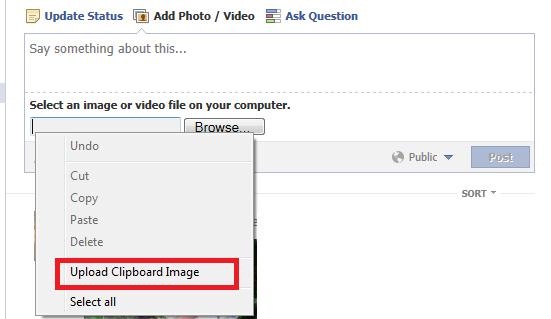
Upload Clipboard ImageMost people upload and share photo files taken by digital cameras. But some of us would like to share images from other source as well, such as a screenshot or a piece of image from some drawing software such as Microsoft Visio. Normally we would have to copy the image to clipboard, save it to a file, browse for the file in the open file dialog and then upload it. It’s not a daunting task but it’s not as convenient as it should be. It could even become painful if you do such a thing frequently. Would it be really convenient if we can directly upload image from the clipboard like a normal paste operation? SlimBrowser has implemented a feature called "Upload Clipboard Image" which makes uploading an image from clipboard as easy as a snap of the finger. Here is how it works. Just right click in the file input box on the left side of the [browse...] button and select “Upload Clipboard Image” from the popup menu. The clipboard image will be automatically saved to a temporary file for uploading. Here is the screenshot of using this feature to share photos on facebook,
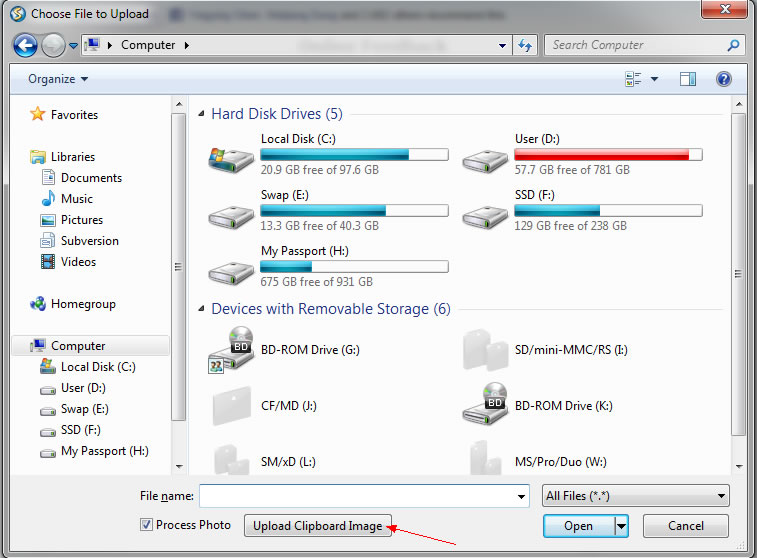
Some of the web page don't show a file input box in their file uploading interface. SlimBrowser lets you upload image from clipboard just as easily in these web pages. Just select the link or click the button to bring up the file selection dialog. You will see an "Upload Clipboard Image" button located at the bottom of the file selection dialog as shown below,
Just click the "Upload Clipboard Image" button and SlimBrowser will paste the clipboard image to a temporary file, and set the file name to be uploaded automatically.
If you are not yet an existing SlimBrowser user, Download SlimBrowser for FREE Now to start enjoying the "Upload Clipboard Image" feature and a lot more other powerful features available in SlimBrowser.
Related Questions
|
| Product | Download | Support | Business Relations |
| What's New Full Feature List Awards & Honors Demonstration Videos Screenshots |
Web Browser Download Skin Download Plugin Download |
Online Manual FAQ Online Feedback Online Forum |
Press Releases Affiliate Program Business Opportunities Company Info Contact Us |
English | Español | Français | Deutsch | Português | Italiano | Nederlandse | Svenska | Magyar | Română | Русский | Polski | 简体 | 繁体 | 日本語 | 한국어
Misc Links
Fastest Web Browser | Slimjet Web Browser | Learn Chinese
Copyright© 2026 FlashPeak Inc. All rights reserved



 English